Rotating Wave Approximation and Rabi Oscillations

Author

Daniel Fischer

Introduction

The coherent interaction of atoms—or other quantum two-level systems—with a strong, monochromatic electromagnetic field lies at the heart of many modern experiments: laser spectroscopy, optical trapping, atomic clocks, quantum information with qubits, and quantum simulation in optical lattices.

In this chapter, we develop the minimal but powerful theoretical framework that describes such interactions non-perturbatively: a two-level system coupled to a classical, monochromatic field.

By the end of this chapter, you should be able to:

  1. Describe the electric dipole interaction of a two-level system with a monochromatic field and define the Rabi frequency.
  2. Derive the equations of motion and transform them into a rotating frame where the time dependence is simplified.
  3. Justify and apply the Rotating-Wave Approximation (RWA), keeping the full algebraic derivation.
  4. Solve the RWA equations to obtain resonant Rabi oscillations, off-resonant (detuned) dynamics, the generalized Rabi frequency, and Autler–Townes splitting / AC–Stark shift
  5. Connect theory to experiment, including: Pulse areas, \(\pi\) an \(\pi/2\) pulses, optical dipole traps and optical lattices

This framework forms the conceptual and mathematical foundation for much of quantum optics, quantum control, and atomic physics today.


1. The Rotating-Wave Approximation (RWA)

Before diving into the details, let us recall that the Rotating-Wave Approximation (RWA) is one of the most powerful simplifications in quantum optics. It allows us to focus on the slow, resonant dynamics of a system while neglecting rapidly oscillating, non-resonant terms that average out over time. We begin by constructing the Hamiltonian for a two-level atom interacting with a classical, monochromatic field.


1.1 Two-Level System Coupled to a Classical Field

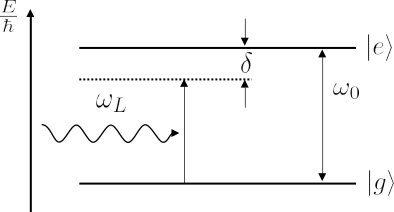
We consider an atom (or any quantum two-level system) with a ground state \(\left\lvert g \right\rangle\) and an excited state \(\left\lvert e \right\rangle\).
The atomic Hamiltonian is

\[ \hat{H}_A = E_e \left\lvert e \right\rangle\!\!\left\langle e \right\rvert+ E_g \left\lvert g \right\rangle\!\!\left\langle g \right\rvert. \]

It is convenient to shift the zero of energy to the midpoint between the two levels, giving

\[ \hat{H}_A = \frac{\hbar \omega_0}{2} \hat{\sigma}_z, \]

where \(\hat{\sigma}_z = \left\lvert e \right\rangle\!\!\left\langle e \right\rvert- \left\lvert g \right\rangle\!\!\left\langle g \right\rvert\) and

\[ \omega_0 = \frac{E_e - E_g}{\hbar}. \]

Energy diagram of a two-level system in a detuned laser field.


Interaction with a Classical Field

The atom interacts with a classical, monochromatic electric field in the electric dipole approximation. We assume the field is spatially uniform across the atom, i.e., the phase factor \(e^{-i k z}\) can be neglected. The electric field is written as

\[ \vec{E}(t) = \frac{1}{2}\left( \vec{E}_0 e^{-i \omega_L t} + \vec{E}_0^* e^{i \omega_L t} \right), \]

where \(\omega_L\) is the laser frequency and \(\vec{E}_0\) the complex field amplitude.

The interaction Hamiltonian in the dipole approximation is

\[ \hat{H}_I(t) = -\hat{\vec{d}} \cdot \vec{E}(t), \qquad \hat{\vec{d}} = -e \vec{r}. \]


Matrix Elements of the Dipole Operator

In the \(\{\left\lvert e \right\rangle, \left\lvert g \right\rangle\}\) basis, the diagonal dipole matrix elements vanish for non-degenerate atomic eigenstates of definite parity, because the integrand is odd:

\[ \langle e | \hat{\vec{d}} | e \rangle = \langle g | \hat{\vec{d}} | g \rangle = 0. \]

The only non-zero matrix elements are off-diagonal:

\[ \vec{d}_{eg} \equiv \langle e | \hat{\vec{d}} | g \rangle , \qquad \vec{d}_{ge} = \vec{d}_{eg}^*. \]

Thus, the interaction Hamiltonian becomes

\[ \hat{H}_I(t) = \begin{pmatrix} 0 & -\vec{d}_{eg}\cdot\vec{E}(t) \\ -\vec{d}_{eg}^*\cdot\vec{E}(t) & 0 \end{pmatrix}. \]


TipPhysical Insight

The off-diagonal terms describe transitions between \(\left\lvert g \right\rangle\) and \(\left\lvert e \right\rangle\). A nonzero dipole matrix element \(\vec{d}_{eg}\) implies that an oscillating electric field can induce transitions between the two levels.


The Rabi Frequency

It is convenient to introduce the (complex) Rabi frequency

\[ \Omega_0 = \frac{\vec{d}_{eg}\cdot\vec{E}_0}{\hbar}, \qquad \tilde \Omega_0 = \frac{\vec{d}_{eg}\cdot\vec{E}_0^*}{\hbar}. \]

With this, the interaction Hamiltonian reads

\[ \hat{H}_I(t) = -\frac{\hbar}{2} \begin{pmatrix} 0 & \Omega_0 e^{-i \omega_L t} + \tilde \Omega_0 e^{i \omega_L t} \\ \tilde \Omega_0^* e^{-i \omega_L t} + \Omega_0^* e^{i \omega_L t} & 0 \end{pmatrix}. \]


Time-Dependent Schrödinger Equation

We expand the total wavefunction in the energy basis as

\[ \left\lvert \psi(t) \right\rangle= c_e(t)\left\lvert e \right\rangle+ c_g(t)\left\lvert g \right\rangle. \]

Inserting this into the time-dependent Schrödinger equation

\[ i\hbar \frac{d}{dt}\left\lvert \psi(t) \right\rangle= (\hat{H}_A + \hat{H}_I)\left\lvert \psi(t) \right\rangle, \]

we obtain coupled equations for the probability amplitudes:

\[ i\hbar \frac{d}{dt} \begin{pmatrix} c_e \\ c_g \end{pmatrix} = \frac{\hbar}{2} \begin{pmatrix} \omega_0 & -(\Omega_0 e^{-i\omega_L t} + \tilde \Omega_0 e^{i\omega_L t}) \\ -(\tilde \Omega_0^* e^{-i\omega_L t} + \Omega_0^* e^{i\omega_L t}) & -\omega_0 \end{pmatrix} \begin{pmatrix} c_e \\ c_g \end{pmatrix}. \tag{1}\]


The explicit time dependence in the off-diagonal terms makes these equations hard to solve directly. To reveal the underlying slow, resonant dynamics, we will now move to a rotating frame in which the state amplitudes evolve more smoothly. This transformation will also expose terms oscillating at \(\omega_L \pm \omega_0\), setting the stage for the rotating-wave approximation.


1.2 Transformation to a Rotating Frame

So far, the coefficients \(c_e(t)\) and \(c_g(t)\) in our Schrödinger equation still carry the rapid phase oscillations associated with the stationary atomic energies \(\pm \hbar \omega_0 / 2\). It is convenient to remove this trivial time dependence by moving into a rotating frame that follows the free evolution of the atom. This will allow us to isolate the slow, driven dynamics produced by the field.

We define new amplitudes \(\tilde c_e(t)\) and \(\tilde c_g(t)\) through the unitary transformation

\[\label{eq:rframe} \begin{pmatrix} c_e(t) \\ c_g(t) \end{pmatrix} = \hat{U}(t)\begin{pmatrix}\tilde c_e(t) \\ \tilde c_g(t)\end{pmatrix}, \qquad \hat{U}(t) \equiv \begin{pmatrix} e^{-i\omega_0 t/2} & 0 \\ 0 & e^{i\omega_0 t/2} \end{pmatrix}. \tag{2}\]

The transformation \(\hat U(t)\) simply removes the free atomic phase evolution generated by \(\hat H_A\). We now derive the equation of motion for \(\tilde{\vec c} \equiv (\tilde c_e, \tilde c_g)^T\).


Rotating-Frame Schrödinger Equation

Substituting Equation 2 into the Schrödinger equation Equation 1, we obtain after some algebra

\[ i\hbar\frac{d}{dt} \begin{pmatrix}\tilde{c}_{e}\\ \tilde{c}_{g}\end{pmatrix} = -\frac{\hbar}{2} \begin{pmatrix} 0 & \Omega_{0}e^{-i(\omega_{L}-\omega_{0})t} + \tilde \Omega_{0}e^{i(\omega_{L}+\omega_{0})t} \\[1em] \tilde \Omega_{0}^* e^{-i(\omega_{L}+\omega_{0})t} + \Omega_{0}^* e^{i(\omega_{L}-\omega_{0})t} & 0 \end{pmatrix} \begin{pmatrix}\tilde{c}_{e}\\ \tilde{c}_{g}\end{pmatrix}. \tag{3}\]

We begin by inspecting the Hermitian conjugate (adjoint) of the unitary operator \(\hat U\):

\[ \hat{U}^\dagger(t) = \begin{pmatrix} e^{+i\omega_0 t/2} & 0 \\ 0 & e^{-i\omega_0 t/2} \end{pmatrix}. \]

Since \(\hat U\) is unitary, its adjoint is also its inverse:

\[ \hat U^\dagger(t)\,\hat U(t) = \hat U(t)\,\hat U^\dagger(t) = \mathbb{1}. \]

Now we proceed with the derivation. Starting from the transformation

\[ \vec c = \hat U \tilde{\vec c}, \]

we differentiate with respect to time:

\[ \frac{d}{dt}\vec{c} = \frac{d\hat U}{dt}\tilde{\vec{c}} + \hat{U}\frac{d\tilde{\vec{c}}}{dt}. \]

Insert this into the Schrödinger equation \(i\hbar \dot{\vec c} = (\hat H_A + \hat H_I)\vec c\) and multiply on the left by \(\hat U^\dagger\):

\[ i\hbar \hat U^\dagger \left( \frac{d\hat U}{dt}\tilde{\vec c} + \hat U \frac{d\tilde{\vec c}}{dt} \right) = \hat U^\dagger (\hat H_A + \hat H_I)\hat U \tilde{\vec c}. \]

Rearrange to isolate the time derivative of \(\tilde{\vec c}\) and use \(\hat U^\dagger \hat H_A \hat U = \hat H_A\):

\[ i\hbar \frac{d\tilde{\vec c}}{dt} = \hat H_A \tilde{\vec c} + \hat U^\dagger \hat H_I \hat U \tilde{\vec c} - i\hbar \hat U^\dagger \frac{d\hat U}{dt} \tilde{\vec c}. \]

Now compute \(i\hbar \hat U^\dagger \frac{d\hat U}{dt}\).
Since

\[ \hat U(t) = \begin{pmatrix} e^{-i\omega_0 t/2} & 0 \\ 0 & e^{i\omega_0 t/2} \end{pmatrix}, \qquad \frac{d\hat U}{dt} = \begin{pmatrix} -i\frac{\omega_0}{2} e^{-i\omega_0 t/2} & 0 \\ 0 & i\frac{\omega_0}{2} e^{i\omega_0 t/2} \end{pmatrix}, \]

it follows that

\[ i\hbar \hat U^\dagger \frac{d\hat U}{dt} = i\hbar \begin{pmatrix} e^{i\omega_0 t/2} & 0 \\ 0 & e^{-i\omega_0 t/2} \end{pmatrix} \begin{pmatrix} -i\frac{\omega_0}{2} e^{-i\omega_0 t/2} & 0 \\ 0 & i\frac{\omega_0}{2} e^{i\omega_0 t/2} \end{pmatrix} = \begin{pmatrix} \frac{\hbar\omega_0}{2} & 0 \\ 0 & -\frac{\hbar\omega_0}{2} \end{pmatrix} = \hat H_A. \]

Thus, the two \(\hat H_A\) terms cancel, yielding

\[ i\hbar\frac{d\tilde{\vec c}}{dt} = \hat U^\dagger \hat H_I \hat U\, \tilde{\vec c}. \]

Finally, inserting the explicit form of \(\hat H_I(t)\) and carrying out the matrix multiplications gives

\[ \hat U^\dagger \hat H_I \hat U = -\frac{\hbar}{2} \begin{pmatrix} 0 & \Omega_{0}e^{-i(\omega_{L}-\omega_{0})t} + \tilde \Omega_{0}e^{i(\omega_{L}+\omega_{0})t} \\[1em] \tilde \Omega_{0}^* e^{-i(\omega_{L}+\omega_{0})t} + \Omega_{0}^* e^{i(\omega_{L}-\omega_{0})t} & 0 \end{pmatrix} \]

Substituting this back yields the rotating-frame Schrödinger equation quoted above.


1.3 Physical Interpretation and Meaning of the Rotating Frame

The representation in the rotating frame clarifies the time scales present in the interaction. Before analyzing those time scales, it is helpful to recall what the unitary transformation does physically and how the two representations relate.

NoteWhat the unitary transformation means

The transformation \(\vec c = \hat U\tilde{\vec c}\) is a change of reference frame that rotates with the atomic frequency \(\omega_0\). It does not change the physical content of the theory but redistributes time dependence between amplitudes and operators. Keep in mind:

  • Mathematical equivalence: Equation 1 and Equation 3 are mathematically equivalent and describe the same system (within the same approximations).

  • Same populations: The observable populations are unchanged by the transformation, \[|c_e|^2 = |\tilde{c}_e|^2, \qquad |c_g|^2 = |\tilde{c}_g|^2.\]

  • Shift of phase factors: In the Schrödinger picture, amplitudes \(c_{e,g}\) carry fast phases at frequency \(\omega_0\). The transformation moves these phases from the amplitudes into the operators by redefining the basis states as \[ \left\lvert e \right\rangle\to e^{-i\frac{\omega_0}{2}t}\left\lvert e \right\rangle,\qquad \left\lvert g \right\rangle\to e^{+i\frac{\omega_0}{2}t}\left\lvert g \right\rangle, \] thereby separating out the effect of the atomic Hamiltonian and leaving an equation that highlights the interaction \(\hat H_I(t)\). This representation is commonly referred to as the interaction picture.

  • Energy-reference caution: Because of the change of basis, eigenvalues of the operator in the new basis are shifted by \(\pm\hbar\omega_0/2\) relative to the original energies. Exercise caution when interpreting absolute energy values in the rotating frame.

Structure of the Rotating-Frame Hamiltonian

The rotated interaction Hamiltonian \(\hat U^\dagger \hat H_I \hat U\) contains two distinct oscillatory contributions:

  • A slowly varying term proportional to \(e^{\pm i(\omega_L-\omega_0)t}\), which is the near-resonant coupling between the two levels.

  • A rapidly oscillating term proportional to \(e^{\pm i(\omega_L+\omega_0)t}\), representing the counter-rotating component of the driving field.

When the drive is near resonance (\(\omega_L \approx \omega_0\)), the first term varies slowly while the second oscillates at roughly \(2\omega_0\). This separation of time scales motivates the rotating-wave approximation (RWA): drop the rapidly oscillating counter-rotating term and keep only the near-resonant coupling. In the rotating frame the field thus appears almost stationary to the atom, which makes the dynamics induced by the near-resonant term dominant.


1.4 The Rotating-Wave Approximation (RWA)

The rotating-wave approximation (RWA) consists of neglecting the counter-rotating terms oscillating at \(\omega_L+\omega_0\) (and similar fast combinations) in Equation 3, yielding

\[ i\hbar\frac{d}{dt} \begin{pmatrix}\tilde c_e \\ \tilde c_g \end{pmatrix} = -\frac{\hbar}{2} \begin{pmatrix} 0 & \Omega_0 e^{-i(\omega_L-\omega_0)t} \\ \Omega_0^* e^{i(\omega_L-\omega_0)t} & 0 \end{pmatrix} \begin{pmatrix}\tilde c_e \\ \tilde c_g \end{pmatrix}. \tag{4}\]

The justification for this approximation rests on two complementary arguments: one based on time-scale separation and the other on near-resonance dynamics.

Time-Scale (Averaging) Argument

To understand the suppression of the fast terms more explicitly, consider that the (slow) evolution of the amplitudes \(\tilde c_{e,g}\) over a short interval \(\Delta t\) is—according to Equation 3—determined by integrals of oscillatory factors of the form

\[ \int_t^{t+\Delta t} e^{i\omega t'}\, \mathrm{d}t' = \frac{1}{i\omega} \left[ e^{i\omega t'} \right]_t^{t+\Delta t}. \]

Evidently, the magnitude of this contribution scales inversely with the oscillation frequency, \(\sim 1/\omega\). Hence, terms that oscillate slowly (small \(\omega\)) have a much stronger cumulative effect on the dynamics than those that oscillate rapidly (large \(\omega\)).

In our problem, the slowly varying co-rotating terms oscillate with frequency \(\omega_L - \omega_0\), while the counter-rotating components oscillate with \(\omega_L + \omega_0\), typically two orders of magnitude faster near resonance. The influence of the latter on the long-term (secular) evolution therefore becomes negligible.

A second, complementary observation is that both kinds of oscillatory terms produce periodic effects. Over many cycles, their net contribution averages to zero. Thus, the counter-rotating terms merely induce small, rapid modulations of the dynamics that can safely be ignored in a good approximation.

Near-Resonance Argument

Near resonance \((\omega_L \approx \omega_0)\), the co-rotating terms evolve slowly and are responsible for the resonant energy exchange between the two levels. The counter-rotating components, oscillating at roughly \(2\omega_0\), average out over any physically relevant timescale. Neglecting these fast oscillations simplifies the equations substantially while retaining the essential resonant physics.


Transformation to the Laser-Frequency Rotating Basis

To eliminate the remaining explicit time dependence in the operator, we now move to a frame rotating with the laser frequency \(\omega_L\). In this frame, the phase oscillation at \(\omega_L\) is transferred from the Hamiltonian to the amplitudes themselves:

\[ \begin{pmatrix} C_e \\ C_g \end{pmatrix} = \begin{pmatrix} c_e e^{i\omega_L t/2} \\[0.3em] c_g e^{-i\omega_L t/2} \end{pmatrix} = \begin{pmatrix} \tilde c_e e^{i(\omega_L - \omega_0)t/2} \\[0.3em] \tilde c_g e^{-i(\omega_L - \omega_0)t/2} \end{pmatrix}. \]

Introducing the detuning \[ \delta = \omega_L - \omega_0, \] and substituting this transformation into the RWA equation removes the residual time dependence, yielding the compact, time-independent form:

\[ i\hbar\frac{d}{dt} \begin{pmatrix} C_e \\ C_g \end{pmatrix} = \frac{\hbar}{2} \begin{pmatrix} -\delta & -\Omega_0\\[0.3em] -\Omega_0^* & \delta \end{pmatrix} \begin{pmatrix} C_e \\ C_g \end{pmatrix}. \tag{5}\]

Equation 5 is central: it encapsulates all the coherent two-level dynamics within the RWA. For constant \(\Omega_0\) and \(\delta\), it forms a linear system with constant coefficients, solvable analytically.


Interpretation of the New Basis

It is important to note the following about the representations involved:

  • Equivalence of representations:
    Equation 4 and Equation 5 are mathematically equivalent; all describe the same two-level system under the RWA.

  • Same physical populations:
    The corresponding amplitudes in the different frames, \(\tilde c_{e,g}\), \(c_{e,g}\), and \(C_{e,g}\), yield identical populations: \[ |c_e|^2 = |\tilde c_e|^2 = |C_e|^2, \qquad |c_g|^2 = |\tilde c_g|^2 = |C_g|^2. \]

  • Dressed states and shifted energies:
    The eigenvalues of the operator in Equation 5 correspond to dressed energies—they are shifted relative to the bare-state energies by \(\pm\hbar\omega_L/2\) for the excited and ground states, respectively. The eigenstates of the time-independent Hamiltonian in the laser-frequency rotating frame are therefore called dressed states, representing coherent superpositions of the atomic states and the driving field.


Together, these transformations and approximations isolate the essential resonant coupling between the two levels and lead to a compact, intuitive picture of light–matter interaction in the rotating-wave approximation.


2. Solutions in the RWA: Rabi oscillations and dressed states

In the previous section we have derived the equations of motion for a two-level atom interacting coherently with a near-resonant field, expressed in the rotating-wave approximation (RWA). We now turn to their solutions. This section provides both a direct time-domain solution for the population dynamics and a more general perspective in terms of dressed states. Before discussing the energy structure, we start with the simplest yet fundamental case—the resonant interaction—where the oscillatory population transfer between ground and excited state becomes most transparent.


2.1 Resonant case: \(\delta=0\) and Rabi oscillations

Set \(\delta=0\) in Equation 5. For simplicity we also take \(\Omega_0\) real (one can always absorb a global phase into the definition of \(\left\lvert g \right\rangle\) or \(\left\lvert e \right\rangle\)).

The equations reduce to

\[ i\hbar\frac{d}{dt}\binom{C_{e}}{C_{g}} =\frac{\hbar}{2} \begin{pmatrix} 0 & -\Omega_{0}\\ -\Omega_{0} & 0 \end{pmatrix} \binom{C_{e}}{C_{g}}. \]

Or equivalently,

\[ \frac{d}{dt}C_{e}=-i\frac{\Omega_{0}}{2}C_{g}, \quad \frac{d}{dt}C_{g}=-i\frac{\Omega_{0}}{2}C_{e}. \]

Differentiate the second equation once more to obtain a second-order ODE for \(C_g\):

\[ \frac{d^{2}}{dt^{2}}C_{g} =-i\frac{\Omega_{0}}{2}\frac{d}{dt}C_{e} =-i\frac{\Omega_{0}}{2}\left(-i\frac{\Omega_{0}}{2}C_{g}\right) =-\frac{\Omega_{0}^{2}}{4}C_{g}. \]

This is a simple harmonic oscillator equation with the solution (for initial conditions \(C_g(0)=1\), \(C_e(0)=0\)):

\[ C_{g}(t)=\cos\!\left(\frac{\Omega_{0}t}{2}\right), \qquad C_{e}(t)=i\sin\!\left(\frac{\Omega_{0}t}{2}\right). \]

Thus the populations oscillate coherently in time:

\[ |C_{e}(t)|^{2}=\sin^{2}\!\left(\frac{\Omega_{0}t}{2}\right), \qquad |C_{g}(t)|^{2}=\cos^{2}\!\left(\frac{\Omega_{0}t}{2}\right). \]

These are the Rabi oscillations, a hallmark of coherent light–matter interaction, with frequency \(\Omega_0\). Two practically important pulse areas follow:

  • A \(\pi\)-pulse (\(\Omega_0 \tau=\pi\)) transfers the entire population \(|C_g|^2 \to 0\), \(|C_e|^2 \to 1\) (complete inversion).
  • A \(\pi/2\)-pulse (\(\Omega_0 \tau=\pi/2\)) prepares an equal superposition with maximal coherence.

This oscillatory behavior stands in stark contrast to the population dynamics obtained from rate equations using Einstein coefficients. In that perturbative picture, photon absorption competes with stimulated emission and spontaneous decay, leading to exponential relaxation toward a steady state. The Rabi model, in contrast, describes the non-perturbative, fully coherent exchange of energy between atom and field—an essential feature when dealing with strong or short laser pulses. However, the effects of spontaneous decay still remain to be included in this model, as they ultimately limit the coherence and lead to damping of the oscillations in real systems.


2.2 Off-resonant case: generalized Rabi frequency and incomplete transfer

For the general case of nonzero detuning \(\delta\neq 0\) and (again) constant \(\Omega_0\) (possibly complex, with phase conventions fixed later), the exact solution of Equation 5 for arbitrary initial amplitudes \(C_e(0)\) and \(C_g(0)\) is given by (see box below for proof)

\[ \begin{align} C_e(t) &= i\,\frac{\Omega_0}{\Omega}\sin\!\left(\frac{\Omega t}{2}\right)\,C_g(0) + \left(\cos\!\left(\frac{\Omega t}{2}\right)+i\frac{\delta}{\Omega}\sin\!\left(\frac{\Omega t}{2}\right)\right)C_e(0),\\ C_g(t) &= i\,\frac{\Omega_0^{*}}{\Omega}\sin\!\left(\frac{\Omega t}{2}\right)\,C_e(0) + \left(\cos\!\left(\frac{\Omega t}{2}\right)-i\frac{\delta}{\Omega}\sin\!\left(\frac{\Omega t}{2}\right)\right)C_g(0), \end{align} \tag{6}\]

where the generalized Rabi frequency is defined by

\[ \Omega \equiv \sqrt{\delta^{2} + \lvert\Omega_0\rvert^{2}}. \tag{7}\]

We derive the closed-form time-evolution for constant \(\Omega_0\) and \(\delta\) by exponentiating the \(2\times2\) RWA Hamiltonian. Start from Equation 5 in matrix form,

\[ i\hbar\frac{d}{dt}\vec{C}(t) = \hat{H}\,\vec{C}(t), \qquad \vec{C}(t)=\begin{pmatrix}C_e(t)\\[0.2em] C_g(t)\end{pmatrix}, \]

with \[ \hat{H} = \frac{\hbar}{2} \begin{pmatrix} -\delta & -\Omega_0\\[4pt] -\Omega_0^{*} & \delta \end{pmatrix}. \]

The formal solution of the time-dependent Schrödinger equation is

\[ \vec{C}(t)=\exp\!\bigl(-\tfrac{i}{\hbar}\hat H t\bigr)\,\vec{C}(0). \tag{8}\]

To compute the matrix exponential use the scaled matrix

\[ \hat{A}\equiv \frac{2}{\hbar}\hat H = \begin{pmatrix} -\delta & -\Omega_0\\[4pt] -\Omega_0^{*} & \delta \end{pmatrix}. \]

A direct computation shows \[ \hat{A}^{2} = \bigl(\delta^{2}+\lvert\Omega_0\rvert^{2}\bigr)\,\mathbb{1} = \Omega^{2}\,\mathbb{1}, \]

where \(\mathbb{1}\) is the \(2\times2\) identity and \(\Omega\) is defined in Equation 7. Because \(\hat A^2\) is proportional to the identity, we can evaluate the exponential exactly using its Taylor series expansion:

\[ \exp\!\Bigl(-\tfrac{i}{\hbar}\hat H t\Bigr) = \exp\!\Bigl(-\tfrac{i}{2}\hat A t\Bigr) = \sum_{n=0}^{\infty}\frac{1}{n!}\Bigl(-\tfrac{i}{2}\hat A t\Bigr)^{n}. \]

Separating even and odd powers and using \(\hat A^2=\Omega^2\mathbb{1}\) gives

\[ \exp\!\Bigl(-\tfrac{i}{2}\hat A t\Bigr) = \sum_{k=0}^{\infty}\frac{1}{(2k)!}\Bigl(-i\tfrac{\Omega t}{2}\Bigr)^{2k}\mathbb{1} - i\,\frac{\hat A}{\Omega}\sum_{k=0}^{\infty}\frac{1}{(2k+1)!}\Bigl(-i\tfrac{\Omega t}{2}\Bigr)^{2k+1}. \]

Recognizing the two sums as the Taylor series for \(\cos\) and \(\sin\) yields

\[ \exp\!\Bigl(-\tfrac{i}{\hbar}\hat H t\Bigr) = \cos\!\left(\tfrac{\Omega t}{2}\right)\mathbb{1} - i\,\frac{\sin\!\left(\tfrac{\Omega t}{2}\right)}{\Omega}\,\hat A. \]

Using Equation 8, we apply this operator to the initial vector \(\vec{C}(0)=(C_e(0),C_g(0))^{T}\) which yields

\[ \begin{align} C_e(t) &= \Bigg[\cos\!\left(\tfrac{\Omega t}{2}\right) + i\frac{\delta}{\Omega}\sin\!\left(\tfrac{\Omega t}{2}\right)\Bigg]C_e(0) + i\frac{\Omega_0}{\Omega}\sin\!\left(\tfrac{\Omega t}{2}\right)\,C_g(0), \\[6pt] C_g(t) &= i\frac{\Omega_0^{*}}{\Omega}\sin\!\left(\tfrac{\Omega t}{2}\right)\,C_e(0) + \Bigg[\cos\!\left(\tfrac{\Omega t}{2}\right) - i\frac{\delta}{\Omega}\sin\!\left(\tfrac{\Omega t}{2}\right)\Bigg]C_g(0), \end{align} \]

which are precisely the expressions in Equation 6 stated above.

Remarks: the crucial algebraic shortcut used here is the relation \(\hat A^2=\Omega^2\mathbb{1}\), which follows from the particular \(2\times2\) structure of the Hamiltonian. This allows the exponential to be expressed through just \(\cos(\Omega t/2)\) and \(\sin(\Omega t/2)\).

If the system is initially in the ground state (\(C_g(0)=1\), \(C_e(0)=0\)) these expressions reduce to

\[ \bigl|C_e(t)\bigr|^{2} = \frac{\lvert\Omega_0\rvert^{2}}{\Omega^{2}}\sin^{2}\!\left(\frac{\Omega t}{2}\right) = \frac{\lvert\Omega_0\rvert^{2}}{2\Omega^{2}}\bigl(1-\cos(\Omega t)\bigr). \]

Hence the dynamics are still oscillatory (see Figure 1), but with two important differences compared with the resonant case:

  • Incomplete population transfer. The detuning prevents full inversion: the excited-state population never reaches unity. The maximum attainable excited population is the prefactor \(\lvert\Omega_0\rvert^{2}/\Omega^{2}<1\).

  • Faster oscillation (generalized frequency). The oscillation frequency is the generalized Rabi frequency \(\Omega\), which satisfies \(\Omega\ge\lvert\Omega_0\rvert\) and thus is larger than the on-resonance Rabi frequency \(\Omega_0\).

These two facts are the essential features of off-resonant coherent driving: detuning reduces transfer efficiency while increasing the oscillation rate.

Code
import numpy as np
import matplotlib.pyplot as plt

# --- Set up plot styling ---
plt.rcParams['text.usetex'] = True
plt.rcParams['font.family'] = 'serif'
plt.rcParams['font.size'] = 12


# Time array in units of Omega_0
t_Omega0 = np.linspace(0, 4*np.pi, 1000)

# Create figure
fig, ax = plt.subplots(1, 1, figsize=(7, 5))

# Resonant case: delta = 0
# |C_e(t)|^2 = sin^2(Omega_0 * t / 2)
Pe_resonant = np.sin(t_Omega0 / 2)**2
ax.plot(t_Omega0 / np.pi, Pe_resonant, 'k-', linewidth=2.5, 
        label='$\\delta/\\Omega_0=0$ (resonant)', zorder=3)

# Off-resonant cases with different detunings
# Generalized Rabi frequency: Omega = sqrt(delta^2 + |Omega_0|^2)
# |C_e(t)|^2 = (|Omega_0|^2 / Omega^2) * sin^2(Omega * t / 2)

detunings = [0.5, 1.0, 2.0]  # delta in units of Omega_0
colors = ['#2ecc71', '#3498db', '#e74c3c']

for i, delta in enumerate(detunings):
    Omega = np.sqrt(delta**2 + 1)  # Omega_0 = 1 in our units
    Pe_off = (1 / Omega**2) * np.sin(Omega * t_Omega0 / 2)**2
    max_Pe = 1 / Omega**2
    
    ax.plot(t_Omega0 / np.pi, Pe_off, color=colors[i], linewidth=2, 
            label=f'$\\delta/\\Omega_0={delta}$ (max: {max_Pe:.3f})', zorder=2)
    ax.axhline(y=max_Pe, color=colors[i], linestyle='--', alpha=0.3, linewidth=1)

# Mark special pulse areas
ax.axvline(x=1, color='gray', linestyle='--', alpha=0.5, linewidth=1)
ax.axvline(x=0.5, color='gray', linestyle=':', alpha=0.5, linewidth=1)
ax.text(0.5, 1.02, '$\\pi/2$', ha='center', va='bottom', fontsize=10, color='gray')
ax.text(1.0, 1.02, '$\\pi$', ha='center', va='bottom', fontsize=10, color='gray')

ax.set_xlabel('$\\Omega_0 t / \\pi$', fontsize=13)
ax.set_ylabel('$|C_e(t)|^2$', fontsize=13)
ax.grid(True, alpha=0.3)
ax.legend(fontsize=11, loc='upper right')
ax.set_ylim(-0.0, 1.08)
ax.set_xlim(0, 4)

plt.tight_layout()
display(fig)
plt.close()
Rabi oscillations showing excited state population versus time. The resonant case (black) oscillates between 0 and 1. Off-resonant cases (green, blue, red) show faster oscillations with incomplete population transfer that decreases with increasing detuning.
Figure 1: Rabi oscillations showing effect of detuning on population transfer

2.3 Dressed states, Autler–Townes splitting, and AC–Stark shift

We now examine the eigenenergies of the coupled two-level system. In the frame rotating with the laser frequency, the energies correspond to the eigenvalues \(E_\pm\) of the Hamiltonian appearing in Equation 5. They are found by setting the characteristic polynomial to zero:

\[ \begin{align} \det\!\begin{pmatrix} -\tfrac{\hbar\delta}{2}-E_\pm & -\tfrac{\hbar\Omega_0}{2} \\[4pt] -\tfrac{\hbar\Omega_0^{*}}{2} & \tfrac{\hbar\delta}{2}-E_\pm \end{pmatrix} &= E_\pm^{2}-\frac{\hbar^{2}\delta^{2}}{4}-\frac{\hbar^{2}|\Omega_{0}|^{2}}{4} = 0 \\[4pt] \Rightarrow\quad E_\pm &= \pm \frac{\hbar}{2}\sqrt{\delta^{2}+|\Omega_{0}|^{2}} = \pm \frac{\hbar}{2} \Omega. \end{align} \tag{9}\]

The corresponding eigenstates are the so-called dressed states, which represent coherent superpositions of the bare ground and excited states in the presence of the driving field.

NoteInterpretation

Figure Figure 2 (left) shows the eigenenergies \(E_\pm\) as a function of detuning \(\delta\). For weak driving (\(|\Omega_0|\!\to\!0\)), the energies approach the linear dependence of the uncoupled states, shown as dashed lines. For finite \(\Omega_0\), the levels no longer cross but exhibit an avoided crossing — the signature of coherent coupling between the atomic states and the field. This energy separation \(E_+ - E_- = \hbar\Omega\) is called the Autler–Townes splitting when it is spectroscopically resolved.

Code
import numpy as np
import matplotlib.pyplot as plt

# --- Set up plot styling ---
plt.rcParams['text.usetex'] = True
plt.rcParams['font.family'] = 'serif'
plt.rcParams['font.size'] = 12


# Detuning range in units of Omega_0
delta_range = np.linspace(-3, 3, 500)

offset = 0.001
delta_rangen = np.linspace(-3, -offset, 250)
delta_rangep = np.linspace(offset, 3, 250)

# Rabi frequency (we'll show multiple values)
Omega0_values = [1]
colors = ['#e74c3c']
labels = [r'Dressed states']

# Create figure with two subplots
fig, (ax1, ax2) = plt.subplots(1, 2, figsize=(7.5, 4))

# ============= LEFT PLOT: ROTATING FRAME (DRESSED STATES) =============
ax1.set_title('Dressed State Energies (Rotating Frame)', fontsize=13, fontweight='bold')

# Plot uncoupled (bare) states as dashed lines

# Plot dressed states for different Omega_0 values
for i, Omega0 in enumerate(Omega0_values):
    # Dressed state energies: E_± = ±(1/2)√(δ² + |Ω₀|²)
    Omega = Omega0*np.sqrt(delta_range**2 + 1)
    E_plus = 0.5 * Omega/Omega0
    E_minus = -0.5 * Omega
    
    ax1.plot(delta_range, E_plus, color=colors[i], linewidth=2, label=labels[i])
    ax1.plot(delta_range, E_minus, color=colors[i], linewidth=2)

ax1.plot(delta_range, -delta_range/2, 'k--', linewidth=1.5, alpha=0.5, label='Bare states')
ax1.plot(delta_range, delta_range/2, 'k--', linewidth=1.5, alpha=0.5)

ax1.axhline(y=0, color='gray', linestyle=':', alpha=0.3)
ax1.axvline(x=0, color='gray', linestyle=':', alpha=0.3)
ax1.set_xlabel('$\\delta / \\Omega_0$', fontsize=12)
ax1.set_ylabel('$E / (\\hbar \\Omega_0)$', fontsize=12)
ax1.legend(fontsize=10, loc='upper right')
ax1.grid(True, alpha=0.3)
ax1.set_xlim(-3, 3)
ax1.set_ylim(-2, 2)

# Add annotation for avoided crossing
ax1.annotate('', xy=(0, .5), xytext=(0, -.5),
            arrowprops=dict(arrowstyle='<->', color='gray', lw=1.5))
ax1.text(0.15, 0, 'Autler-Townes\nsplitting', fontsize=9, color='gray')

# ============= RIGHT PLOT: LABORATORY FRAME =============
ax2.set_title('Energies in Laboratory Frame', fontsize=13, fontweight='bold')

# For the lab frame, we add ±ω₀/2 and use sgn(δ) for the shifts
# We'll set ω₀ = 10 in units of Omega_0 for visualization
omega_0 = 3

for i, Omega0 in enumerate(Omega0_values):
    Omega = np.sqrt(delta_rangen**2 + Omega0**2)
    sgn_delta = np.sign(delta_rangen)
    # E_e = (ω₀/2) + (δ/2) - sgn(δ)·√(δ² + |Ω₀|²)/2
    E_e = 0.5*omega_0 + 0.5*delta_rangen - 0.5*sgn_delta*Omega    
    # E_g = -(ω₀/2) - (δ/2) + sgn(δ)·√(δ² + |Ω₀|²)/2
    E_g = -0.5*omega_0 - 0.5*delta_rangen + 0.5*sgn_delta*Omega
    ax2.plot(delta_rangen, E_e, color=colors[0], linewidth=2, label=labels[0])
    ax2.plot(delta_rangen, E_g, color=colors[0], linewidth=2)

    Omega = np.sqrt(delta_rangep**2 + Omega0**2)
    sgn_delta = np.sign(delta_rangep)
    # E_e = (ω₀/2) + (δ/2) - sgn(δ)·√(δ² + |Ω₀|²)/2
    E_e = 0.5*omega_0 + 0.5*delta_rangep - 0.5*sgn_delta*Omega    
    # E_g = -(ω₀/2) - (δ/2) + sgn(δ)·√(δ² + |Ω₀|²)/2
    E_g = -0.5*omega_0 - 0.5*delta_rangep + 0.5*sgn_delta*Omega
    ax2.plot(delta_rangep, E_e, color=colors[0], linewidth=2)
    ax2.plot(delta_rangep, E_g, color=colors[0], linewidth=2)

# Plot bare states (without coupling)
E_e_bare = 0.5*omega_0 + 0.*delta_range
E_g_bare = -0.5*omega_0 - 0.*delta_range
ax2.plot(delta_range, E_e_bare, 'k--', linewidth=1.5, alpha=0.5, label=r'$\pm\frac{\hbar\omega_0}{2}$')
ax2.plot(delta_range, E_g_bare, 'k--', linewidth=1.5, alpha=0.5)

#ax2.axhline(y=0, color='gray', linestyle=':', alpha=0.3)
ax2.axvline(x=0, color='gray', linestyle=':', alpha=0.3)
ax2.set_xlabel('$\\delta / \\Omega_0$', fontsize=12)
#ax2.set_ylabel('$E / (\\hbar \\Omega_0)$', fontsize=12)
ax2.legend(fontsize=10, loc='upper right')
ax2.grid(True, alpha=0.3)
ax2.set_yticks([])
ax2.set_xlim(-3, 3.05)
ax2.set_ylim(-2.4, 2.4)


# Add annotation for avoided crossing
arrow_xpos = -1.5
ax2.annotate('', xy=(arrow_xpos, -omega_0/2), xytext=(arrow_xpos, omega_0/2),
            arrowprops=dict(arrowstyle='<->', color='gray', lw=1.5))
ax2.text(arrow_xpos+0.15, 0, r'$\hbar\omega_0$', fontsize=9, color='gray')


# --- Add the fake break here ---
# Coordinates for the rectangle to hide the middle section
break_y_min = -0.1
break_y_max = 0.1
#break_x_min = -0.1 # x position of left spine
#break_x_max = 0.3 # Width of the break patch, set slightly larger than the spine

# Add a white rectangle to hide the axis spine in the break region
#rect = Rectangle((break_x_min, break_y_min), break_x_max, break_y_max - break_y_min,
#                 facecolor='white', edgecolor='white', zorder=3, transform=ax.transData)
#ax.add_patch(rect)
ax2.spines['left'].set_visible(False)
ax2.spines['right'].set_visible(False)
ax2.vlines(ax2.get_xlim()[0],ax2.get_ylim()[0], break_y_min+0.05, color='black', linewidth=1)
ax2.vlines(ax2.get_xlim()[0],ax2.get_ylim()[1], break_y_max, color='k', linewidth=1)
ax2.vlines(ax2.get_xlim()[1]-0.05,ax2.get_ylim()[0], break_y_min+0.05, color='k', linewidth=1)
ax2.vlines(ax2.get_xlim()[1]-0.05,ax2.get_ylim()[1], break_y_max, color='black', linewidth=1)
# Add the break symbol "//"
ax2.text(ax2.get_xlim()[0], (break_y_min + break_y_max) / 2+0.03, r'$//$',
        ha='center', va='center', fontsize=14, color='black', rotation=90)
ax2.text(ax2.get_xlim()[1]-0.05, (break_y_min + break_y_max) / 2+0.03, r'$//$',
        ha='center', va='center', fontsize=14, color='black', rotation=90)


plt.tight_layout()
plt.show()
Two subplots showing the energy levels of a two-level atom coupled to a laser field. Left: Dressed states in the rotating frame with avoided crossings. Right: Energies in the lab frame with shifts due to coupling.
Figure 2: Dressed state energies in the rotating frame (left) and the laboratory frame (right) as a function of detuning for various Rabi frequencies.

To express the energies in the non-rotating (laboratory) frame, we must account for the transformation used in the rotating frame: the dressed ground-state energy is reduced by \(\hbar\omega_L/2\), and the dressed excited-state energy increased by \(\hbar\omega_L/2\) (see discussion at the end of Section 2.4).
We obtain

\[ \begin{align} E_e(\delta,\Omega_0)&=\frac{\hbar}{2}\omega_0+\frac{\hbar}{2}\delta\mp\frac{\hbar}{2}\sqrt{\delta^2+|\Omega_0|^2},\\[4pt] E_g(\delta,\Omega_0)&=-\frac{\hbar}{2}\omega_0-\frac{\hbar}{2}\delta\pm\frac{\hbar}{2}\sqrt{\delta^2+|\Omega_0|^2}. \end{align} \]

There is a certain ambiguity here, since \(E_+\) and \(E_-\) can, in principle, be assigned to either of the bare atomic states, leading to four possible combinations. Physically, however, only two of these branches connect continuously to the bare energies \(\pm\tfrac{\hbar\omega_0}{2}\) in the limit \(\Omega_0 \to 0\). The remaining ambiguity is resolved only in a full quantum treatment of the field (the Jaynes–Cummings model).

Within the semiclassical picture, we therefore select the continuous branches and use the \(\operatorname{sgn}\) function to ensure the correct dependence on the detuning \(\delta\):

\[ \begin{align} E_e(\delta,\Omega_0)&=\frac{\hbar}{2}\omega_0+\frac{\hbar}{2}\delta-\operatorname{sgn}(\delta)\frac{\hbar}{2}\sqrt{\delta^2+|\Omega_0|^2},\\[4pt] E_g(\delta,\Omega_0)&=-\frac{\hbar}{2}\omega_0-\frac{\hbar}{2}\delta+\operatorname{sgn}(\delta)\frac{\hbar}{2}\sqrt{\delta^2+|\Omega_0|^2}. \end{align} \]

These energies are plotted in Figure Figure 2 (right). In the limit of large detuning \(|\delta|\gg|\Omega_0|\), the square root can be expanded as

\[ \operatorname{sgn}(\delta)\sqrt{\delta^2+|\Omega_0|^2} = \delta\sqrt{1+\frac{|\Omega_0|^2}{\delta^2}} \approx \delta + \frac{|\Omega_0|^2}{2\delta}, \]

which yields the approximate eigenenergies

\[ \begin{align} E_e(\delta,\Omega_0)&=\frac{\hbar}{2}\omega_0-\frac{\hbar|\Omega_0|^2}{4\delta},\\ E_g(\delta,\Omega_0)&=-\frac{\hbar}{2}\omega_0+\frac{\hbar|\Omega_0|^2}{4\delta}. \end{align} \]

In this perturbative regime, the energy levels are shifted by

\[ \Delta E_{\text{AC}}=\frac{\hbar|\Omega_0|^2}{4\delta}, \tag{10}\]

known as the AC–Stark shift. It represents the energy shift of an atomic level due to an off-resonant driving field. The shift has opposite signs for the two levels: for red detuning (\(\delta<0\)), the ground state is lowered in energy, creating attractive optical potentials — a key mechanism in optical dipole traps.

Using the relations

\[ \Omega_0=\frac{d_{eg}E_0}{\hbar},\qquad I=\frac{1}{2}c\varepsilon_0E_0^2,\qquad \gamma=\frac{d_{eg}^2\omega_0^3}{3\pi\varepsilon_0\hbar c^3}, \]

where
- \(I\) is the laser intensity (directly measurable), and
- \(\gamma = 1/\tau\) is the natural linewidth of the transition (measured from the spontaneous decay rate \(\tau^{-1}\)),

the AC–Stark shift can be written entirely in terms of experimentally accessible quantities:

\[ \Delta E_{\text{AC}}=\frac{3\pi c^2}{2\omega_0^3}\frac{\gamma}{\delta}I. \]

TipSummary
  • Autler–Townes splitting: observed near resonance, where coupling mixes the states and produces an avoided crossing with energy separation \(\hbar\Omega\).
  • AC–Stark shift: the large-detuning limit (\(|\delta|\gg|\Omega_0|\)), where the coupling only shifts the bare energy levels by \(\pm\hbar|\Omega_0|^2/(4\delta)\).

3. Physical consequences and applications

In the previous sections we derived how a two-level atom interacts coherently with a near-resonant optical field, obtained explicit time-dependent solutions for the amplitudes, and analyzed the corresponding energy structure in terms of dressed states. The mathematical formalism developed there — Rabi oscillations, detuning, and light-induced energy shifts — now allows us to understand a broad range of physical effects and experimental techniques in atomic, molecular, and optical physics.

This section highlights a few representative consequences and applications of the atom–light interaction. The goal is to connect the abstract theory to measurable phenomena: how precisely timed laser pulses can manipulate quantum states, how far-detuned light fields create conservative potentials for trapping atoms, and how spectroscopic measurements reveal the underlying level structure of the coupled system.


3.1 Pulse area control: coherent state preparation

From the analytic solutions we saw that the system’s evolution depends on the pulse area

\[ A = \int \Omega_0(t)\, dt. \]

For near-resonant excitation (\(|\delta| \ll |\Omega_0|\)) and a slowly varying envelope, the final populations depend only on the total area of the pulse, not on its detailed temporal shape. This property allows precise, reproducible control over the internal quantum state of an atom.

A pulse with area \(A = \pi\) transfers the entire population from the ground to the excited state — often called a \(\pi\)-pulse. A pulse with \(A = \pi/2\) brings the atom into an equal superposition of the two states, generating maximum coherence between them. These controlled transitions form the operational basis for many precision and quantum technologies:

  • In Ramsey interferometry, two \(\pi/2\) pulses separated by a free-evolution period are used to measure frequency differences with high precision.
  • In atomic clocks, such coherent manipulations define the time standard by locking the laser frequency to the atomic resonance.
  • In quantum information processing, single-qubit rotations are realized by tuning pulse areas and detunings to achieve specific unitary transformations.

Thus, control of the pulse area translates mathematical parameters like \(\Omega_0(t)\) and \(\delta\) directly into physical control knobs in the laboratory.


3.2 Optical dipole traps and lattices

Even when the driving laser is far detuned from resonance, the coupling still induces an energy shift of the atomic levels. For red detuning (\(\delta < 0\)), the shift of the ground-state energy is (see Equation 10)

\[ U(\vec{r}) \approx -\frac{\hbar |\Omega_0(\vec{r})|^2}{4|\delta|} \propto -\frac{I(\vec{r})}{\delta}, \]

where \(I(\vec{r})\) is the local laser intensity. Atoms experience this shift as a conservative potential and are drawn toward intensity maxima. A tightly focused red-detuned laser beam therefore acts as a dipole trap, confining atoms near its focus without requiring resonant scattering (and thus with very low heating).

By intersecting several such beams, the resulting standing-wave interference pattern produces a periodic modulation of intensity. The corresponding potential landscape,

\[ U(x) \propto -I_0 \cos^2(kx), \]

is known as an optical lattice, which can trap atoms in a regular array of potential wells. These light-induced periodic potentials provide an exceptionally clean platform to study condensed-matter phenomena, such as Bloch oscillations, tunneling, and quantum phase transitions — but with complete control over the parameters. The underlying principle — the AC-Stark shift discussed earlier — thus connects directly to modern experiments in ultracold atoms and quantum simulation.


3.3 Spectroscopic manifestation: Autler–Townes splitting

The dressed-state picture derived in Section 2 also predicts clear and observable signatures in spectroscopy. If a strong coupling laser drives one transition of an atom, and a weak probe laser scans across the same resonance, the probe no longer sees a single absorption line. Instead, the spectrum splits into two distinct peaks separated by \(\hbar\Omega\), where

\[ \Omega = \sqrt{|\Omega_0|^2 + \delta^2} \]

is the generalized Rabi frequency. This Autler–Townes splitting arises because the strong drive mixes the two bare atomic levels into new eigenstates — the dressed states — each with its own resonance frequency.

Experimentally, this doublet is a direct and striking confirmation of coherent atom–light coupling. In the resonant case (\(\delta \approx 0\)), the splitting equals \(\hbar|\Omega_0|\) and increases linearly with the field amplitude. For large detunings, the peaks merge again and the residual level shift corresponds to the AC-Stark shift, which we derived as

\[ \Delta E_{AT} = \frac{\hbar|\Omega_0|^2}{4\delta}. \]

Thus, the Autler–Townes effect and the AC-Stark shift represent two limiting cases of the same underlying physics: the modification of atomic energy levels by a coherent driving field. These effects bridge fundamental quantum dynamics with observable phenomena in laser spectroscopy, coherent control, and precision measurement.


4. Limitations of the RWA and beyond

Up to this point we have used the rotating-wave approximation (RWA) to simplify the atom–field interaction. This approximation neglects the rapidly oscillating counter-rotating terms in the interaction Hamiltonian, retaining only those that vary slowly in the rotating frame. It allows us to describe the dynamics in terms of resonant coupling with a single Rabi frequency and yields elegant analytic solutions such as those derived above.

The RWA works remarkably well for optical transitions driven near resonance, provided that the coupling strength is much smaller than the optical frequency itself:

\[ \Omega_0 \ll \omega_0, \qquad |\delta| \ll \omega_0. \]

In this regime, the fast oscillating terms average to zero over many optical cycles, and the dynamics of interest — population transfer, Rabi oscillations, and light shifts — unfold on much slower timescales. Most experiments in atomic, molecular, and optical physics fall safely within this regime, which explains the wide success of the RWA in describing laser–atom interactions.


4.1 Breakdown of the RWA: counter-rotating effects

When the driving field becomes extremely strong or very short in duration, the neglected terms begin to play a role. In the full interaction Hamiltonian (before applying the RWA), one encounters contributions proportional to \(\exp[\pm i(\omega_0+\omega_L)t]\), which oscillate at sum frequencies rather than near-resonant differences. If \(\Omega_0\) is no longer negligible compared to \(\omega_0\), these terms cannot be averaged out.

A first observable consequence is the Bloch–Siegert shift, a small additional frequency shift beyond the ordinary AC–Stark shift. It originates from the counter-rotating component that drives virtual transitions at the sum frequency \(\omega_0+\omega_L\), slightly modifying the resonance condition. This shift is typically very small in optical transitions but can be measurable in microwave or radiofrequency experiments, where \(\Omega_0/\omega_0\) is not extremely small.

Beyond simple shifts, the breakdown of the RWA leads to richer phenomena such as:

  • Higher-harmonic generation due to non-sinusoidal motion of the atomic dipole moment.
  • Nonlinear Rabi oscillations with asymmetric excitation envelopes.
  • Dynamic Stark effects and multiphoton transitions when the driving field spans a broad frequency range.

These effects signal that the atom responds not only to the resonant component of the field but also to its rapidly oscillating part — the “counter-rotating” partner usually discarded in the RWA.


4.2 Fully quantum description: the Jaynes–Cummings model

So far, the field has been treated classically as an oscillating electromagnetic wave. To describe situations involving single photons, spontaneous emission, or entanglement between atoms and light, we must quantize the field. This leads to the Jaynes–Cummings model, in which the two-level atom interacts with a single quantized field mode.

The Jaynes–Cummings Hamiltonian,

\[ \hat{H}_{\mathrm{JC}} = \hbar\omega_c\,\hat{a}^\dagger\hat{a} + \frac{\hbar\omega_0}{2}\hat{\sigma}_z + \hbar g \bigl(\hat{a}^\dagger \hat{\sigma}_- + \hat{a}\,\hat{\sigma}_+\bigr), \]

resembles the RWA Hamiltonian, but now the coupling involves photon creation and annihilation operators \(\hat{a}^\dagger\) and \(\hat{a}\). The constant \(g\) is the single-photon coupling strength. This model not only explains the dressed-state picture in a fully quantum manner but also resolves certain ambiguities that arise in the semiclassical treatment — for instance, how to consistently assign energies when the field itself carries quantized energy quanta.

In the strong-coupling regime of cavity or circuit QED, the Jaynes–Cummings model predicts vacuum Rabi splitting, Rabi oscillations involving single photons, and the formation of entangled atom–photon states. Such effects represent the natural continuation of the ideas developed under the RWA, extended into the fully quantum domain.


4.3 Summary

The rotating-wave approximation is one of the most powerful simplifications in light–matter theory. It distills the essential resonant dynamics into a tractable form and accurately describes a vast range of optical phenomena. Nevertheless, recognizing its limits — and understanding how to go beyond it — provides deeper insight into the full richness of coherent interactions, from the small corrections observed in the Bloch–Siegert effect to the fully quantum mechanical behavior captured by the Jaynes–Cummings model.


Key takeaways

  • Starting from the dipole interaction \(-\hat{\vec d}\cdot\vec E(t)\), the two-level Schrödinger equation contains rapidly oscillating terms at frequencies \(\omega_L \pm \omega_0\).
  • A unitary transformation into a rotating frame removes the fast-varying atomic phase; algebraically, this is \(\vec c = \hat U(t)\,\tilde{\vec c}\) with \(\hat U=\mathrm{diag}(e^{-i\omega_0 t/2},\,e^{i\omega_0 t/2})\).
  • The Rotating-Wave Approximation (RWA) neglects the counter-rotating terms oscillating at \(\omega_L+\omega_0\), yielding a simple effective \(2\times2\) Hamiltonian with detuning \(\delta=\omega_L-\omega_0\) and Rabi frequency \(\Omega_0\).
  • On resonance (\(\delta=0\)), the populations undergo Rabi oscillations at frequency \(\Omega_0\).
  • Off resonance, the oscillation frequency becomes the generalized Rabi frequency \(\Omega=\sqrt{\delta^2+|\Omega_0|^2}\), and the maximum excitation is reduced by a factor \(|\Omega_0|^2/\Omega^2\).
  • Strong off-resonant driving leads to AC-Stark (Autler–Townes) shifts \(\Delta E_{AT}\sim \hbar|\Omega_0|^2/(4\delta)\), which are used to create optical trapping potentials.
  • The RWA has a well-defined domain of validity; beyond this regime, counter-rotating effects become important, and a fully quantum treatment of the field (e.g., the Jaynes–Cummings model) is required.